UX Handbook #
Introduction #
The UX handbook is created to establish consistent design practices, improve efficiency, and ensure high-quality user experiences across the organization. The handbook will be used to guide new hires, streamline design processes, and maintain consistency in UX across all projects.
UX Principles #
User-centricity
Consistency
Hierarchy
Context
User control
Accessibility
Usability
Design Thinking #
Design Thinking is really important because it helps us create products that people actually enjoy using. When we use Design Thinking, we focus on understanding what our user need and want. This helps us come up with better ideas and solutions. It also helps us work together as a team and try out new ideas, which can lead to creating products that are both unique and successful. Without design thinking creating a product would be like cooking a meal without knowing the recipe. Design Thinking is like having a recipe that guides us to create something unique and appealing
Design Phases #
Empathy: Understanding the user’s needs and problems. Conduct interviews, surveys, and observations to see things from the user’s perspective.
Define: To clearly define the problem based on our understanding of the user Use insights to create a clear problem statement, like identifying that users need a faster way to find products.
Ideate: Generating a wide range of ideas and solutions. Brainstorm creative solutions, such as improving search algorithms or redesigning layouts.
Prototype: To create simple, testable models of our ideas. Create sketches or wireframes to develop basic models for testing.
Test: To gather user feedback on our prototypes and refine our solutions /make improvements. Let users interact with prototypes, gather feedback, and make improvements based on what works well or needs fixing.
Implement: Put the final solution into action. Take the refined solution and develop it into a fully functional product or feature for users to start using.
Design Guidelines #
UI Components: Buttons, forms, navigation, etc. Consistency and reusability of components.
Visual Design: Color Palettes: Organizational color guidelines. Typography: Font choices, hierarchy, and readability. Imagery: Use of icons, images, and illustrations.
Interaction Design: Animation Guidelines: When and how to use animations. Feedback and Response: Designing for user feedback (e.g., loading states, success messages).
Accessibility: Accessibility Standards: WCAG guidelines and best practices. Inclusive Design: Designing for users with different abilities.
User Persona #
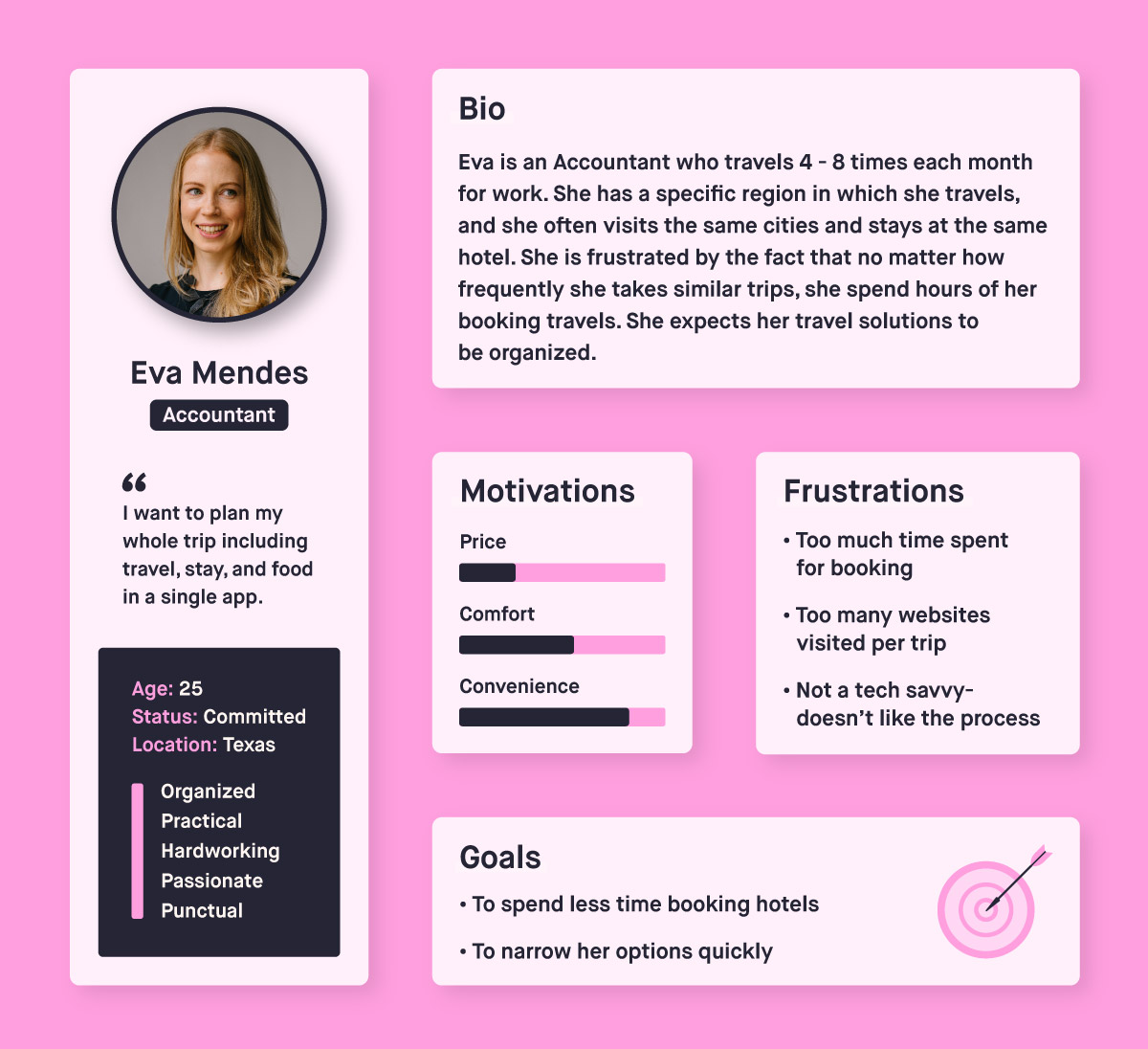
A user persona is a fictional representation of an ideal user based on research and data. It helps designers and developers understand the needs, goals, behaviors, and pain points of their target audience. Personas typically include demographic information, motivations, challenges, and scenarios that describe how the user would interact with a product or service. By using personas, teams can design more user-centered solutions that address the specific needs and preferences of their users.
User Research #
User research is the process of understanding users’ behaviors, needs, and pain points through various methods like interviews, surveys, and usability testing. It helps design teams create user-centered solutions by providing insights into what users want, how they interact with products, and where they experience challenges. This research guides design decisions, validates assumptions, and improves product usability, ensuring the final product meets users’ needs effectively.
Common User Research Methods: #
Interviews: Conducting one-on-one conversations with users to gain deep insights into their experiences, preferences, and challenges.
Surveys and Questionnaires: Gathering data from a larger audience through structured questions to identify trends and patterns.
Usability Testing: Observing users as they interact with a product to identify usability issues and gather feedback on the design.
Field Studies: Observing users in their natural environment to understand how they use a product in real-life contexts.
Personas: Creating detailed profiles of target users based on research findings to guide design decisions.
User Journey Mapping: Visualizing the steps users take to achieve a goal with the product, identifying pain points and opportunities for improvement.
Common UI/UX Issues #
Inconsistent Navigation
Slow Load Times
Poor Mobile Optimization
Unclear Call-to-Action(CTAs)
Over Complicated Forms
Broken Links and 404 Errors
Inconsistent Design Elements